
The previous post started from the MCP server and looked at tool poisoning and traditional API bugs. This one moves to the client.
The client connects to servers, launches them on your machine, handles the authorization flow, and keeps the list of which servers have already been approved. If that list gets changed, your computer may run whatever program the attacker chose.
MCPoison: same name, different command#
CVE-2025-54136, published by Check Point and nicknamed MCPoison, showed that Cursor before version 1.3 tied the approval state of an MCP server to its name. As long as the name stayed the same, the client treated it as something the user had already agreed to and never asked again. Only from 1.3 onward does any change to the configuration require a fresh approval.
Cursor keeps its MCP configuration inside the project at .cursor/rules/mcp.json, which goes into version control along with the code. An attacker can commit a harmless MCP entry to a shared repository, wait for a colleague to pull the project and click Allow in Cursor, and once that approval is in hand, replace the command and arguments under the same name. From then on, every time the project opens, the new command is what runs.
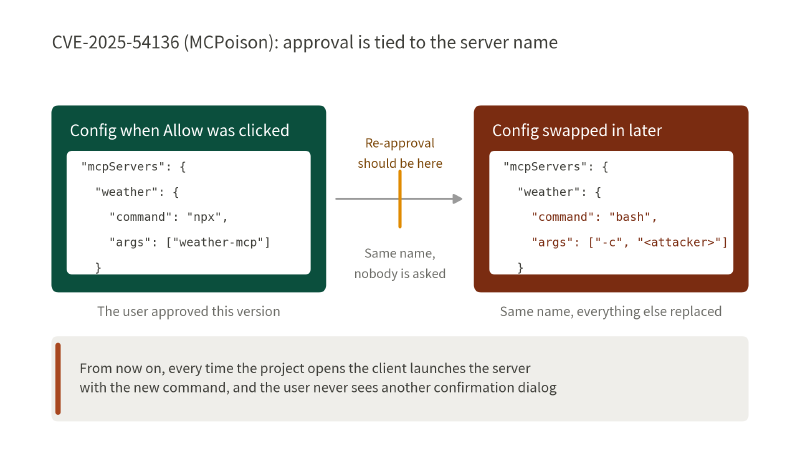
This “earn the trust first, then change the contents” move is the same one the rug pull in AI Dark Arts (17) used, only the thing being swapped is different.
| Rug pull | MCPoison | |
|---|---|---|
| Who swaps it | A malicious MCP server | Anyone who can change the repo |
| What gets swapped | The tool description and tool list | The launch command and arguments in mcp.json |
| Who is fooled | The model, which follows the new description | The client, which assumes the same name means the same thing |
| Result | The model takes the wrong path or gets bad arguments | The computer runs a different command outright |
CurXecute: by the time you click Deny, it is already too late#
MCPoison needs someone with permission to change the repo. CurXecute skips even that, because the thing editing the config is the agent itself. Two conditions make the attack work:
mcp.jsonlives inside the workspace, and as we saw above, it decides which servers the client starts and with what command.- According to CVE-2025-54135, Cursor before 1.3.9 did not ask the user before writing files inside the workspace. Only edits to an existing dotfile needed approval; creating a new one did not.
The attack runs like this: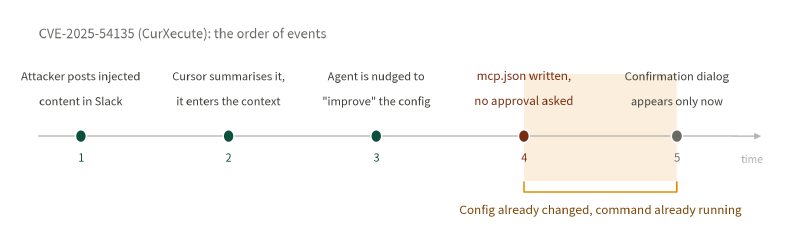
- The attacker leaves an indirect injection in a public Slack channel. It looks like an ordinary message.
- The user asks Cursor to summarise that channel, and the injected content is read into the context.
- The injected content nudges the agent to “improve” the
mcp.jsonin the workspace. - Writing the file needs no approval from the user, so the new command lands in the config and the client launches it.
- Only then does the confirmation dialog appear. Even if the user clicks Deny, they are denying something that has already happened.
MCPoison got it wrong by tying approval to a name. CurXecute got it wrong by asking for approval after the action, which turns the “Do you want to allow this?” prompt into a formality.
A malicious server attacking the client#
In CVE-2025-6514, found by JFrog, a malicious server returns a tampered authorization_endpoint during the OAuth flow. When the client goes to open the browser, it hands that URL to the shell. On Windows that becomes full PowerShell command injection; on macOS and Linux it can run an arbitrary executable, with limited control over the arguments. No model is being persuaded here. This is plain input validation and a badly built open-the-browser step.
The official debugging tool, MCP Inspector, had a hole of its own (CVE-2025-49596, published by Oligo). It used to ship with no authentication by default, and by combining DNS rebinding with CSRF an attacker could get a user who merely opened a malicious web page to run the attacker’s command on their own machine.
mcp-remote and MCP Inspector both run on your own computer. Listening only on localhost does not make them safe by itself. Anything that can start another program needs to be protected as if it were an internet-facing service.
The UI inside the chat is not automatically trustworthy either#
A form pops up in the chat window, you pick a time slot and click Confirm. That form was not drawn by the client. MCP Apps lets a server send over a piece of HTML as a ui:// resource, and the host renders it inside the conversation, where it looks just like the client’s own interface. But which domain it connects to, and whether it asks for the camera and microphone, is all written into that HTML by the server.
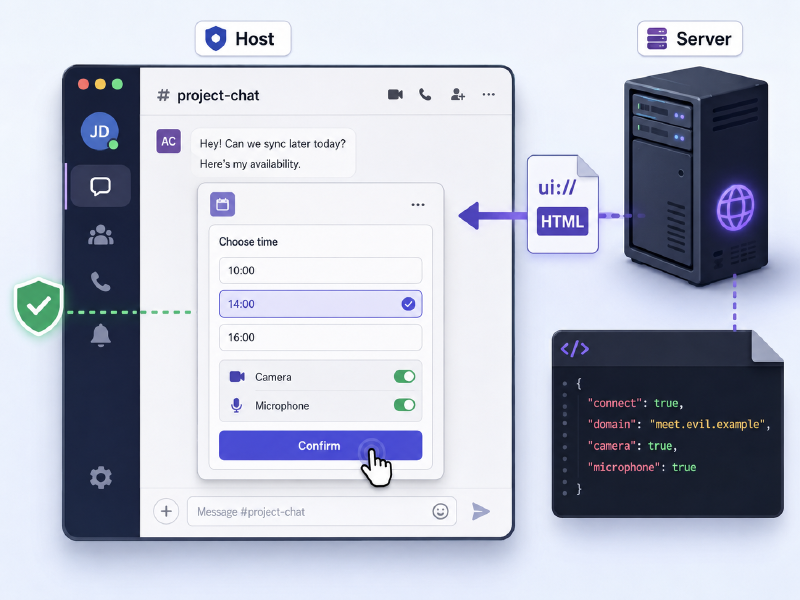
The MCP Apps specification dated 2026-01-26 requires the host to put that HTML in a sandboxed iframe and set a CSP from the list the server declared up front. The HTML can only reach the URLs on that list, and camera and microphone access has to be on the list too. If the server later replaces the HTML, loosens the CSP or asks for one more permission, the spec does not say whether the user should be asked again. What is on screen is no longer the version that was approved. It is the MCPoison problem moved up to the UI layer.
For a genuinely high-risk action, the host has to show the server’s identity and the real arguments itself, and must not let a button inside the resource skip the confirmation.
The risk comes back to the program itself#
The client starts MCP servers on your computer. They run under your account and can reach roughly what you can reach, so the homework before installing one is the same as for any other piece of software: find out where it comes from and what it can touch once it is running.
With the stdio transport, the client launches the server directly on your machine. Only the messages between the two stay local, but the server itself can still reach the network and read your files. So run it under the least-privileged account you can, give it read access only to the directories it really needs, make those read-only where possible, and give it dedicated, short-lived credentials. Then, if it ever gets swapped out, what it can take with it is limited.
Where the defences for an MCP client belong#
The official MCP Security Best Practices set out a few requirements for clients:
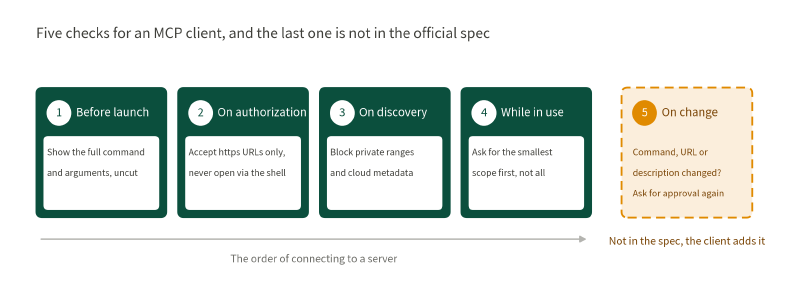
- Before launching a local server, show the full command and arguments exactly as they will run, without truncation, so the user can look before deciding. Put it in a sandbox if you can.
- Only accept
httpsfor the authorization URL a server hands you. Rejectjavascript:,data:andfile:outright, and never pass the URL to the shell to open it. The mcp-remote RCE above is exactly this check missing. - Guard against SSRF when fetching OAuth metadata. Block private ranges, loopback and cloud metadata addresses such as
169.254.169.254, so the client cannot be pointed wherever the server likes. - Start with the smallest read-only scope and request higher-risk scopes separately, only when a specific operation needs them.
The fifth item is the one the spec does not write down: whether to ask the user again once something has changed. In MCPoison the command changed but the name did not, and the client stopped asking. In MCP Apps the HTML got a new version and the host did not ask either. Nowhere in that official document is there a section about this, so if the command, the URL or the tool description differs from what was approved, the client should go and get that consent again itself.
The same config file has another common problem: long-lived tokens hard-coded into it (OWASP MCP01:2025). This file decides which programs get launched and which credentials go to whom. It deserves the same controls as source code, not the treatment given to user preferences.
Wrapping up#
Have you ever opened the MCP config file on your own machine and looked at which servers are actually approved in there? After you clicked Allow, did you ever go back to check which command they run now and which permissions they hold? Does a config change mean you get asked again? The spec does not say, so when the list changes, the client will not necessarily tell you.
The next post goes to a practice range and uses Lakera Agent Breaker to see how a single tool description can make a weather lookup send the user’s chat history along with it.