
What is a Cookie?#
An HTTP cookie is a piece of information the server gives to the client. When the server gets an HTTP request, it sends a cookie back to the client’s browser with the Set-Cookie: header, and the browser stores it. The next time the browser visits the same site, it sends the cookie to the server. The server can then recognize the client and let the user keep browsing, as if the browser was never closed. A cookie has three main purposes, and they make browsing smoother:
Management: the server uses it to remember things, such as a login.
Settings: the client’s own settings, such as the background theme.
Tracking: a record of what the user does.
Cookie safety, guarded by three flags#
As we can see, a cookie holds sensitive things like the user’s identity. So we need proper controls to protect it. The three most common flags are Secure, HttpOnly, and SameSite. Secure and HttpOnly mainly stop the cookie from being stolen, while SameSite stops CSRF attacks.
Secure: stops the cookie from being sent in an unsafe way. Once it is on, the cookie is only sent to the server over HTTPS.
HttpOnly: stops the cookie from being seen. Once it is on, JavaScript cannot read document.cookie.
SameSite: only requests from the same origin as the cookie can succeed. It has three values.
Strict: the cookie is only sent on its own site. Banks often use this.
Lax: when a page redirects to another site, the cookie is sent along too. Most sites use this mode.
None: SameSite is not used, and cross-site access is allowed.
Good to know: from Chrome 84 and later, if a cookie has no SameSite flag, Chrome sets it to
SameSite=Laxby force.
Even in OWASP Top 10:2021, cookie risk is still on the list#
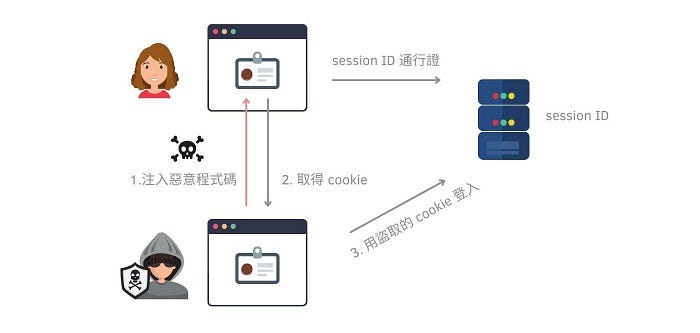
If we do not turn on Secure, HttpOnly, and SameSite, there is a high chance of the A07 Identification and Authentication Failures risk. An attacker can use a stolen cookie to pretend to be the victim, then read sensitive data or run harmful actions on the site.
How to turn on the three flags#
To lower the risk, it is a good idea to turn on Secure, HttpOnly, and SameSite. Besides setting them on the server, you can also turn them on with a WAF.
Turn on Secure, HttpOnly, SameSite flags on an IIS Server#
In Web.config, set the values below.
<system.web>
  <httpCookies  sameSite="[Strict|Lax]" httpOnlyCookies="true" requireSSL="true"/>
</system.web>
Turn on Secure, HttpOnly, SameSite flags on a WAF#
For F5, see the official links for how to set Secure and HttpOnly.
For FortiWeb, here is how to set Secure, HttpOnly, and SameSite.
config waf cookie-security
  edit "<cookie-security_name>"
    set secure-cookie enable
    set HTTP-only enable
    set samesite disable
    set samesite-value [strict|lax]
  end
end