
What is EDL / EBL#
Introduction#
In the past, when we saw a malicious IP, the firewall admin had to add the IP into the rules by hand. This takes a lot of time and effort. Today, security awareness is growing and security issues are many and complex. Security staff should spend their time on other security work, not on banning IPs one by one. That is why major firewall vendors offer the EDL (External Dynamic Lists) / EBL (External Block List) feature to speed up network access control.
On Palo Alto firewalls, the feature is called EDL (External Dynamic Lists). On FortiGate, it is called EBL (External Block List).
Benefits and requirements#
Benefits of EDL / EBL:
Faster import of block lists: put the malicious IP list from your threat intel source directly on the EDL / EBL server, and the update is done. No need to change any firewall rules.
No more hardware object limits: every firewall has a limit on the number of IP objects it can hold. When the firewall fetches the list from the EDL / EBL server, this limit is no longer a problem.
One list shared by many devices: companies and government offices always have more than one firewall, such as the main office, branch sites, and data centers. With EDL / EBL, all of them can fetch the same list.
Requirements of EDL / EBL:
One more server to maintain: the list is stored on a server, and the firewalls fetch data from it. So you need to maintain one extra server.
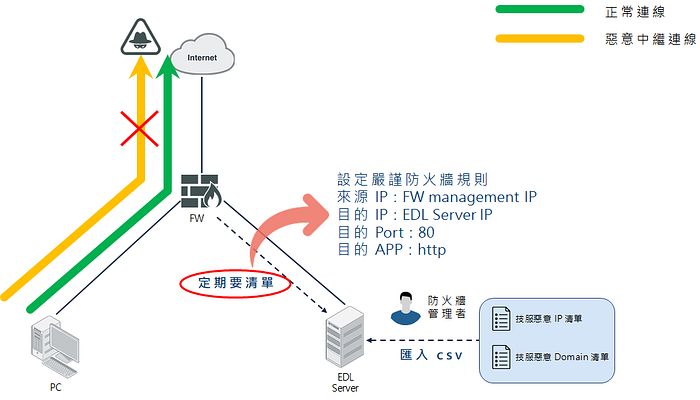
Check the connection to the EDL / EBL server regularly: you need a firewall rule that allows the firewall to reach the EDL / EBL server. If the firewall cannot connect to the server for any reason, it cannot get the IP list.
Firewalls need to update from the EDL / EBL server regularly: the firewall sends update requests on a schedule, which adds more firewall logs. You can adjust how often this happens based on your needs, and the default timing is different for each vendor.
How EDL / EBL works#
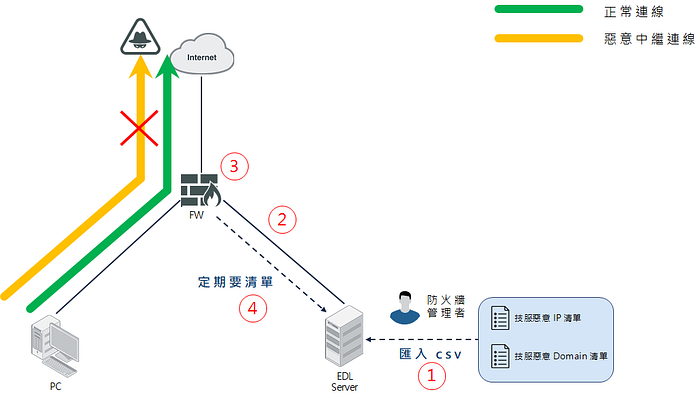
Import the list to the EDL / EBL server
Set up the EDL / EBL feature on the firewall
Create a firewall rule that uses the EDL / EBL as its object
The firewall fetches the list from the EDL / EBL server on a schedule, so you never need to change the firewall rules again
How to use EDL / EBL#
Requirements#
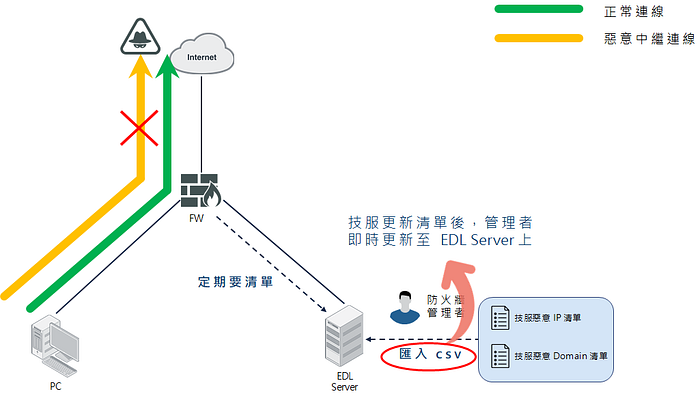
- Update the list content regularly to keep it fresh
- Allow the connection in the firewall rules
Setup guides#
Summary#
Compared with the old way of getting a malicious IP list and adding each IP to the firewall by hand, EDL / EBL only needs a simple setup and import. It makes block list updates much faster and helps you block malicious C2 servers and spyware sooner.